Basic Rules
All line wins pay from left to right on adjacent reels, starting with the leftmost reel.
All wins are shown in currency.
Malfunction voids all pays and plays.
Only the highest scatter win is paid per play.
Scatter wins are paid in addition to line wins.
Only the highest win is paid per winning combination.
Wins on multiple lines are added together.
Wild substitutes for all symbols except  and
and  .
.
and .BASE GAME
40 Hot Diamond Desire is a 5x4 video slot played on 40 paylines.
Wilds appear on reels 2, 3 & 4 only. Wilds landing on the reel will expand across the entire reel.
3, 4 or 5 award x3, x20, x100 total bet, respectively.
award x3, x20, x100 total bet, respectively. appears on reels 1, 3 and 5 only. 3 award x20 total bet.DIAMOND BONUS
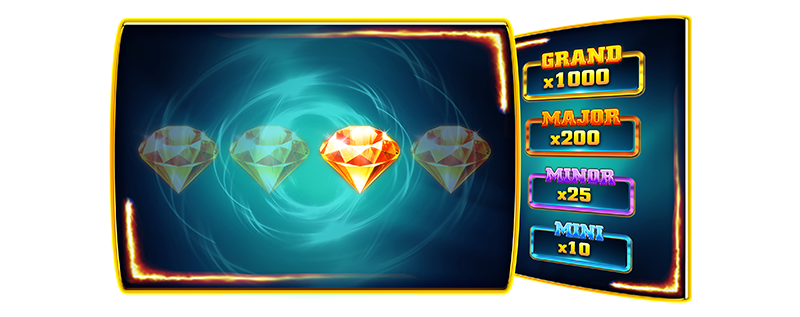
The diamond bonus can be triggered randomly on any spin.
The player picks one out of four diamonds on the screen.
The pick can reveal one of four cash prizes or a no-win.
The cash prizes are Mini (x10 total bet), Minor (x25 total bet), Major (x200 total bet) and Grand(x1000 total bet).
No win will award nothing.
CUMULATIVE WIN LIMIT
The cumulative win limit is 3100 multiplied by the total bet.
Winnings per symbol are calculated for Bet amount of {BET_AMOUNT}.
RTP of this game is %.
Wild symbol
Scatter symbol
x5 1000
x4 200
x3 30
Scatter symbol
x3 200
x5 750
x4 50
x3 12
x2 2
x5 125
x4 25
x3 10
x5 125
x4 25
x3 10
x5 50
x4 12
x3 5
x5 25
x4 7
x3 2
x5 25
x4 7
x3 2
x5 25
x4 7
x3 2
x5 25
x4 7
x3 2
Paylines
1
2
3
4
5
6
7
8
9
10
11
12
13
14
15
16
17
18
19
20
21
22
23
24
25
26
27
28
29
30
31
32
33
34
35
36
37
38
39
40
Maximum win per this jurisdiction!
Be aware - maximum win allowed in the jurisdiction you are currently playing is {JURISDICTION_MAX_WIN_CAP_AMOUNT}. This means, that even though game may display higher win amounts, your balance will be credited only for {JURISDICTION_MAX_WIN_CAP_AMOUNT}.
WIN/LOSS
Maximum Bet: {amount}
Maximum Win: {amount}
Maximum Hourly Loss: {amount}
MAX WIN PROBABILITY
The probability of the maximum win displayed in this game refers to the sum of winnings of the highest possible symbol values, across all possible win criteria - either as a single game round or collectively as part of a feature. This may, or may not, include additional winnings obtained through extra win multiplying possibilities within the game. Higher winnings are also possible at a lower probability.
Quick start
Game starts by setting a selected Bet amount and by pressing the Spin button. Round ends when reels stop and there are no wins, or after the win presentation if there are wins.
Turbo mode (where available)
Turbo mode is speeding up reels spinning animation when enabled. This option does not influence the game round result but only visual presentation.
Super Turbo mode (where available)
Super Turbo mode is speeding up reels spinning animation beyond Turbo mode when enabled. This option does not influence the game round result, but only the visual presentation.
Visual Elements
This game includes visual elements that change as you play. These elements are for entertainment purposes only and do not influence the outcome of the game. Each spin is independent, and the results are determined by a random number generator (RNG). Visual changes do not affect the game's Return to Player (RTP).
Game menu
Game menu contains options and settings that control some of the game features:
- History - Displays previous rounds from the current session
- Close Game - Closes the game client
- Sound - Controls the Sound FXs in the game (on/off)
- Music - Controls the Music in the game (on/off)
- Turbo mode (where available) - Controls the Turbo mode feature (on/off)
Game is paused while the menu is visible and can be closed by pressing the Close button or anywhere on the screen.
Bet selection
Game starts with a default Bet amount set for the game. Player can change the Bet amount by either:
- Using Up and Down arrow buttons next to the Bet Amount
- Pressing the Bet amount where Bet Amount selector will open up
Bet amount cannot be changed during a game round and if there is a win presentation happening, changing bet Amount will reset the presentation.
Autoplay mode (where available)
Autoplay mode enables automatic play of game. It can be enabled or disabled at any time during the Base game. Autoplay mode is enabled by pressing the Autoplay button which allows the player to select:
- Number of rounds to be played automatically.
- Loss Limit (where available) - Disables the Autoplay mode if Balance is reduced by more than Loss Limit amount.
- Stop on Bonus Feature (where available) - Disables the Autoplay mode when Bonus game or Free games are triggered.
- Stop on Win above (where available)- Disables the Autoplay mode when there is a single round win exceeding the amount entered.
Spin button will display the remaining number of spins to be played automatically.
Pressing on the Autoplay button while Autoplay mode is enabled will reset the number of Rounds and disable the Autoplay mode.
Malfunction
A malfunction of the game voids all pays. In case the game round is interrupted, it can be restored by simply starting the game again. If it is not restored, the round is voided within the jurisdictional requirements or operator's policy and their terms and conditions.
User interface
Start a game round. You can also use a space bar (desktop only)
Change the bet amount for the round to be played
Display autoplay mode settings (where available)
Enable/Disable Turbo mode (where available)
Super Turbo mode (where available)
Open menu
Display/Hide game rules
Turn the music/sound submenu